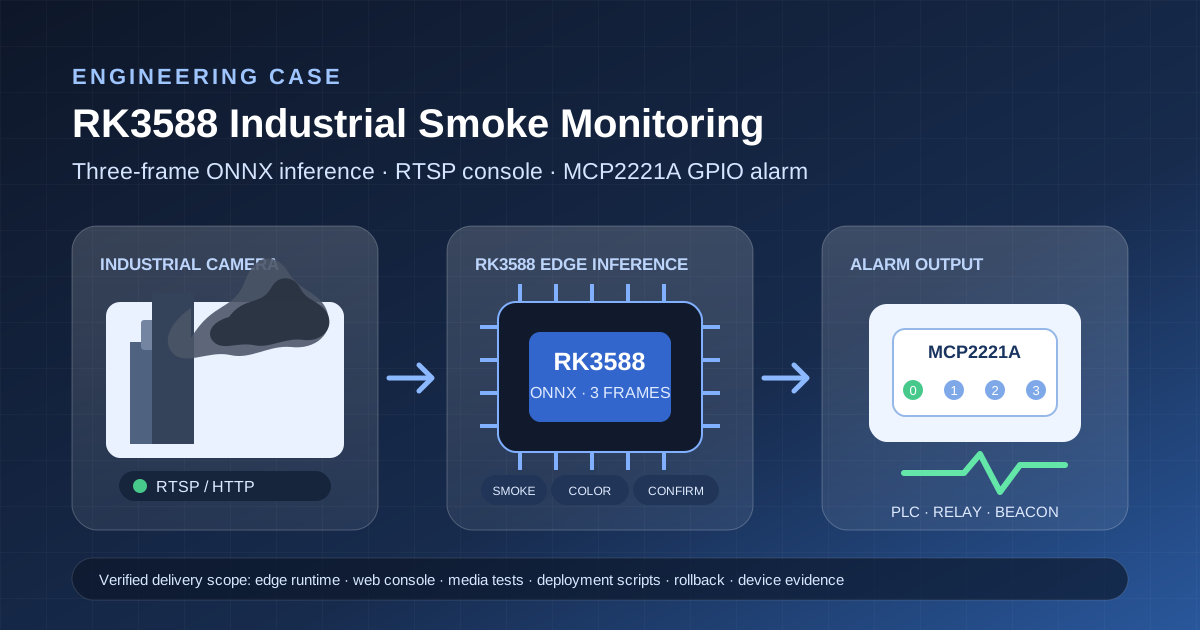
Case summary
Beijing Winge Technology Co., Ltd. delivered a single-channel industrial smoke monitoring system on an RK3588 Ubuntu edge computer. A three-frame MobileNetV3-Small ONNX model first determines whether smoke is present. During daytime operation, a second stage classifies the smoke as black smoke, non-black smoke, or uncertain. After the black-smoke condition remains valid for the confirmation period, an MCP2221A GPIO pin provides the configured alarm level.
The delivery included the model, RTSP video access, a web console, image and video tests, systemd and Nginx deployment, GPIO integration, an ARM64 package, rollback backups, checksums, and device verification records. “Black smoke” in this case is a project color label; it is not a Ringelmann opacity grade, pollutant concentration measurement, or regulatory emissions determination.
Project background
The customer needed to connect one industrial camera to an RK3588 computer on a controlled LAN, display a continuous preview, and evaluate smoke state locally. The system also had to provide configurable high or low logic levels on MCP2221A GP0-GP3 pins for downstream PLC, relay, or audible/visual alarm integration.
The work therefore covered more than a classifier: video decoding, ARM64 deployment, automatic service startup, browser configuration, error handling, test-output isolation, customer installation assets, and rollback. The target environment was RK3588, Ubuntu 22.04 ARM64, Nginx, Gunicorn, OpenCV DNN, and ONNX inference.
Delivery scope
| Item | Delivered content |
|---|---|
| Smoke stage | Three-frame MobileNetV3-Small ONNX smoke classification |
| Color stage | Daytime black-smoke, non-black-smoke, and uncertain classification |
| Video input | RTSP, HTTP, or local video with browser MJPEG preview |
| Web console | Stream URL, algorithm switch, color threshold, GPIO pin, and active-level settings |
| Media tests | Image and video tests with an optional MCP2221A output link |
| Alarm output | Selectable GP0-GP3 with active-high or active-low behavior |
| Deployment | Nginx, Gunicorn, systemd, udev, health checks, static-IP tool, and rollback package |
| Artifacts | ARM64 application package, models, scripts, tests, documents, and SHA-256 files |
Technical architecture
The processing path is: industrial camera or uploaded media → OpenCV/FFmpeg decoding → three-frame temporal smoke classification → fixed-view and abnormal-frame guards → daytime smoke-color classification → continuous confirmation → MCP2221A GPIO output → web status and logs.
The RK3588 runtime loads the ONNX model through OpenCV DNN and does not require PyTorch. Nginx exposes the LAN HTTP endpoint, while Gunicorn listens only on 127.0.0.1:8000. Application files and models are placed in /opt/smoke-control, persistent settings are stored in /var/lib/smoke-control/config.json, and smoke-control.service manages automatic startup.
Two-stage decision and alarm policy
The first stage evaluates three consecutive frames. The color stage runs only after the first stage reports smoke. In daytime mode it returns black_smoke, non-black smoke, or uncertain. At night, the baseline retains smoke detection but returns unknown_night for color and does not issue a black-smoke alarm.
An alarm requires all four conditions: smoke is present, the color stage reports black smoke, color confidence reaches the configured threshold, and the condition remains valid for the confirmation time. The project baseline used two seconds. Uploaded-media tests can remain isolated from the live GPIO path; when the output link is explicitly enabled, the test holds the configured level and then returns control to live automatic mode.
Field issues and engineering fixes
The fixed camera view contained dark furniture, glass reflections, static dark scenes, pure-black test frames, binary graphics, noisy black frames, and dark gradients. The project added a verified-background guard, a structure-constrained static-scene guard, pure-black and near-binary image guards, a live-stream static gate, and an overall-dark abnormal-frame guard.
The overall-dark rule matches only when mean grayscale is at most 24 and the 99th percentile is at most 50. A reverse scan of 1,760 readable project images produced 0 matches. The darkest known black-smoke sample had a mean of 19.32, but its 99th percentile was 62, so the positive sample was not rejected.
A separate issue occurred with black smoke against a bright background. The earlier rule required dark pixels to occupy at least 14% of the frame, while the customer’s 37-second clip measured 9.03%–11.38%. The revision applies an 8% lower bound only when background P90 is at least 250; ordinary dark scenes do not use this compensation.
Verification results
The following figures come from internal project records dated 2026-07-26 through 2026-07-29. They apply to the stated software, model, samples, device, and test methods. They demonstrate the listed delivery path and regressions, not general-purpose accuracy across arbitrary sites.
| Verification item | Result and condition |
|---|---|
| Customer video | 37 s, 1024×540, 30 FPS, 1,110 decoded frames, 74 samples at 0.5 s intervals |
| Device video result | Smoke 74/74; black-smoke candidates 73/74; simulated alarm condition met |
| Output boundary | The recorded video acceptance used output_isolated=true and did not drive GPIO |
| v1.9.4 classification regression | TP 57, FN 8, FP 2, TN 83; no additional FP versus the recorded baseline |
| v2.0.3 local tests | 70 tests passed, plus 18 subtests |
| Abnormal dark-image regression | 13 black, near-black, noise, gradient, JPEG, PNG, and black-background text variants remained no-smoke |
| Reverse dataset scan | The new overall-dark guard matched 0 of 1,760 images |
| Customer-device dark tests | Three noisy or gradient dark images did not activate linked output |
| Known black-smoke positive | Smoke confidence 98.53%; color confidence 99.99%; positive result preserved |
| Live final samples | Six consecutive samples: stream connected, no smoke, no alarm, GP0 low |
| Deployment integrity | Four changed-file SHA-256 values matched the device; service active and enabled |
Project outcome
- Completed the path from RTSP ingestion and ARM64 inference to two-stage decisions and GPIO output.
- Centralized stream, algorithm, threshold, pin, and active-level settings in a LAN web console.
- Separated uploaded-media testing, live monitoring, and hardware output behavior to reduce unintended test activation.
- Added regression-backed guards for fixed-view dark scenes, black frames, binary graphics, noise, gradients, and bright-background smoke.
- Supplied application and model packages, deployment scripts, tests, documentation, SHA-256 checks, and device rollback points.
Suitable scenarios
- Fixed-view smoke monitoring prototypes or engineering verification in industrial sites.
- Edge computer vision inference and LAN control on RK3588 ARM64 devices.
- Projects that convert a visual decision into a PLC, relay, or audible/visual alarm input.
- Single-channel monitoring that should run locally and reduce raw-video upload requirements.
- Custom vision projects that need iterative false-positive and false-negative tuning with site data.
Delivery boundaries and risks
This system is not a statutory emissions instrument. It does not produce a Ringelmann grade or pollutant concentration and cannot replace environmental testing, certification, or a regulator’s determination. Camera exposure, white balance, compression, weather, lighting, background, view angle, and smoke distance affect color results. The baseline does not force a black-smoke classification at night.
MCP2221A provides logic-level output only and cannot directly drive a high-current load. PLCs, relays, beacons, or sirens require a driver or opto-isolation selected for the downstream voltage, current, isolation, and fail-safe requirements, followed by field electrical acceptance.
The baseline console is intended for a controlled LAN. Cross-network or public deployment requires authentication, access control, HTTPS, protection of camera credentials, and log redaction. Production acceptance should freeze a site dataset and define precision, recall, false-alarm frequency, missed-event scope, recovery time, endurance duration, and restart tests.
Frequently asked questions
How does the system decide that smoke is black?
It first detects smoke from three frames and then classifies color during daytime operation. Smoke, black-smoke color, the configured confidence threshold, and the confirmation duration must all be satisfied.
Can the baseline classify black smoke at night?
No. The delivered baseline keeps smoke detection at night but returns unknown_night for color and does not trigger a black-smoke alarm. Night classification needs separate data and acceptance rules.
Is this equivalent to Ringelmann opacity monitoring?
No. “Black smoke” is a visual project label. The system does not output a Ringelmann grade, particulate concentration, or statutory emissions result.
Can it connect to an existing camera and PLC?
It can be evaluated after receiving the RTSP/HTTP stream, codec, resolution, frame rate, network conditions, and the PLC or alarm input’s electrical specification. MCP2221A output needs suitable driving and isolation.
Does another RK3588 device require new verification?
Yes. OS, OpenCV/FFmpeg version, camera stream, network, temperature, load, and camera view can change stability and results. Build, functional, false-alarm, missed-event, output, and endurance tests should be repeated.


 Online

 Phone
Phone

 WeChat



 Top
Top