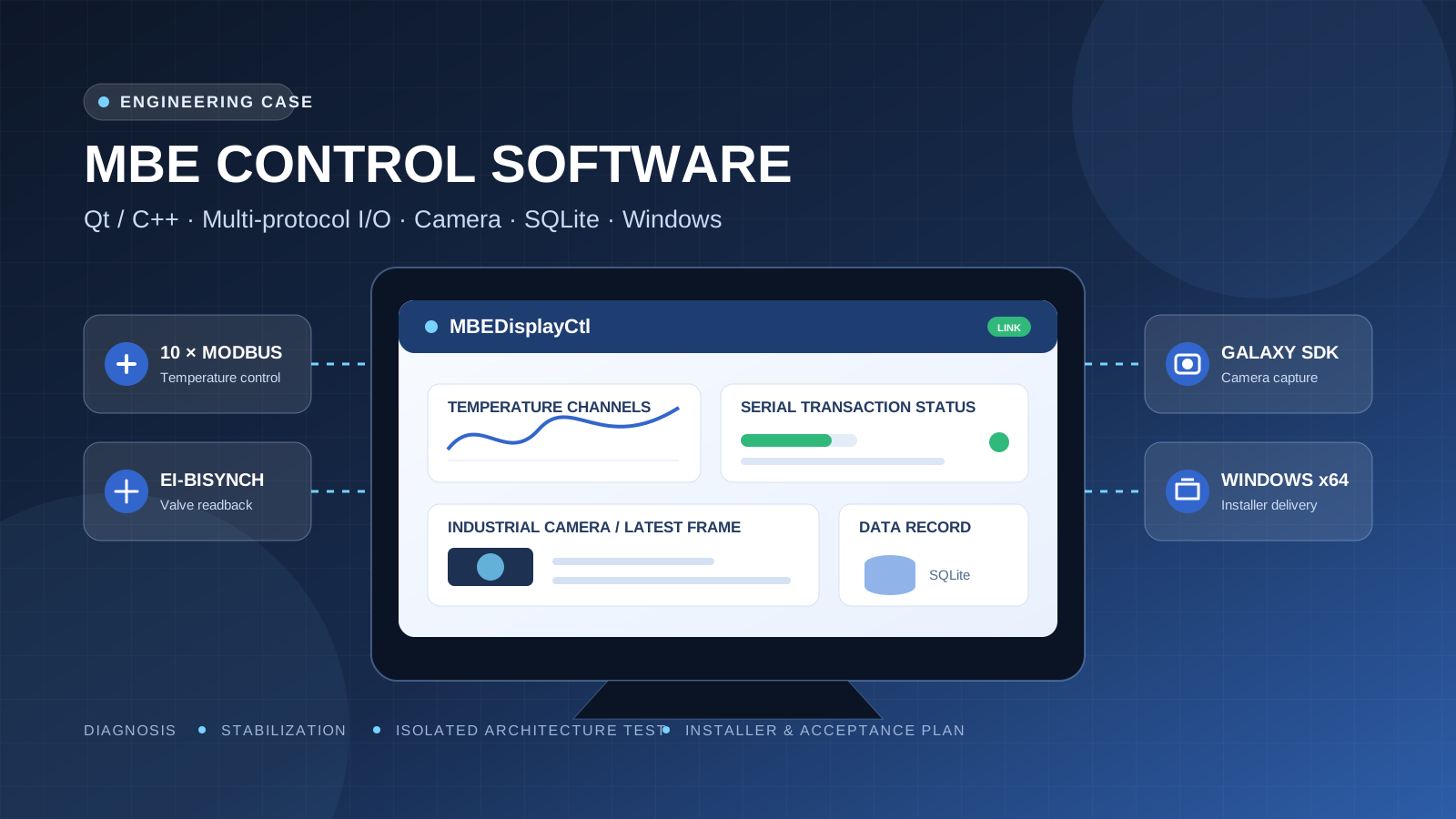
Project overview
This project addressed a Windows supervisory control application for semiconductor process equipment. The Qt/C++ system communicates with temperature controllers, a valve, vacuum gauges, shutter controllers and an industrial camera, while SQLite stores device samples, command events and camera-frame metadata. The work focused on diagnosing intermittent data, incomplete command confirmation, a camera frame-rate regression and silent recording stalls without interrupting the running site application.
Delivery followed two isolated tracks. The maintenance track applied bounded, reversible changes to the existing application and produced a Windows x64 installer. A separate v2 track used its own directory and application identifier to test clearer ownership of serial ports, database connections, camera workers and script execution. Existing configuration and historical data were preserved, and software that could connect to equipment was not launched without an operator-approved safety window.
System scope and technology
| Area | Technology or equipment | Work performed |
|---|---|---|
| Control application | Windows 10/11 x64, Qt 5.12.12, C++, MSVC | Diagnosis, stability changes, Release build and installer |
| Temperature control | Ten Modbus RTU controllers at 9600 baud | Shorter reads, serialized transactions, write-response and SP readback |
| Valve and shutters | EI-BISYNCH and device-specific responses | Protocol parsing, ACK/NAK and state validation |
| Industrial camera | Galaxy SDK with a 125 ms baseline exposure | Latest-frame scheduling, ACK correction, capture and storage watchdogs |
| Data and scripts | SQLite, JPEG and process scripts | Single-writer path, separate timestamps, simulation and explicit failure boundaries |
Evidence-based diagnosis
A read-only review covered approximately 8.89 hours of historical logs and databases. COM5 reported 5,168 buffer resets after the receive buffer exceeded 128 bytes, while effective updates from ten temperature controllers were substantially slower than the configured two-second period. Code inspection showed that each high-frequency poll read about 35 registers and returned roughly 75 bytes. GUI scheduling, slow database batches and a 150 ms wait window increased the chance that a late response would overlap a new request.
Two historical camera records from the same computer provided a second comparison. The earlier baseline wrote JPEG files at 8.006 FPS, while a regressed build wrote 3.919 FPS; neither sample contained adjacent identical JPEGs. The source path queued raw-frame acknowledgements back to the camera worker. A blocking acquisition could run before that acknowledgement, so a new frame was regularly skipped while the prior frame still appeared pending. These numbers establish the regression and its diagnostic context; they are not a post-fix field acceptance result.
Bounded maintenance of the existing application
The maintenance track retained the existing user interface, device configuration, data folders and process-script entry points. Modified files were backed up before replacement, and both the patch archive and installer received SHA-256 records. The installer preserves existing MBE_Data, Scriptfile and device configuration content, and it does not automatically start the control application after installation.
- High-frequency temperature reads were reduced to the registers needed for PV, SP and Working SP, changing a typical response from about 75 bytes to about 15 bytes.
- A Sub temperature write now matches the Modbus
0x06response and then reads SP; a missing or inconsistent response is reported as a failure. - Camera capture is worker-driven, while preview and raw recording each allow only one frame in flight and prefer the most recent frame.
- Temperature engineering values are no longer divided by ten a second time in the status display and legacy control path.
Hardware readback for Ramp Rate
The Ramp Rate cell now starts as -- instead of displaying a software-generated fixed value. The application then reads device register 0x0023. During steady operation, it reads one controller every three seconds, completing a cycle across ten controllers in about 30 seconds. Ramp Rate is kept outside the high-frequency PV/SP request so it does not lengthen every response on the 9600-baud bus.
This change corrects the source of the displayed value: the interface shows a number only after device data arrives. Synchronization after an operator changes the device setting still requires a 1.0.3 field run, so the implementation is not presented as completed hardware acceptance.
Camera capture and storage path
Preview and recording use latest-frame semantics. If the GUI or JPEG encoder is temporarily slower than acquisition, intermediate frames may be replaced instead of forming an unbounded event queue. The raw-frame acknowledgement releases its atomic flag directly rather than waiting behind another blocking camera call. File names and database fields use the real acquisition time, while save-start and save-completion times are recorded separately.
Version 1.0.3 adds two watchdog paths. If the camera is open but no raw frame arrives for three seconds, the application closes and reopens acquisition with a ten-second restart cooldown. If a save task or the interval since the last persistence exceeds three seconds, the storage watchdog releases the stalled state and retries with the current frame. These mechanisms address silent stalls; they do not replace field diagnosis of the driver, USB path, disk throughput or database errors.
Isolated v2 architecture test line
The v2 build uses a separate source tree, application identifier and installation directory. It does not replace the installed legacy application. By default it does not connect serial ports, start monitoring, open the camera or send shutter commands at startup. A physical serial port is owned by one PortWorker, and polling, operator commands and script commands enter a single priority transaction queue.
SQLite has one writer connection, with device samples and camera metadata committed by time or batch threshold; historical queries use a separate read-only connection. Camera acquisition, preview and JPEG recording run as distinct responsibilities. The process script advances through short state-machine steps, sends equipment commands through one controller bus, and stops when a response or target-value readback fails.
Build, packaging and data retention
Maintenance version 1.0.3 was built with CMake and MSVC in Release x64 and packaged with Inno Setup 6.7.3. The Release executable measured 1,727,488 bytes. The installer stage contained 78 files totaling 66,292,772 bytes. Checks found the Galaxy SDK, Qt libraries, SQLite driver, VC Runtime and device configuration, with no Qt Debug DLLs.
The installer version is 1.0.3.20260728 and its size is 19,884,961 bytes. Full SHA-256 values are retained in the delivery record for the executable, patch archive and installer. The installer is not Authenticode-signed, so Windows may show an unknown-publisher notice; this remains a delivery limitation.
Verification evidence and boundaries
| Verification item | Recorded result | Boundary |
|---|---|---|
| Historical data diagnosis | 8.89 hours of logs; 5,168 COM5 buffer resets | Confirms the former fault, not the result of the repair |
| Historical camera comparison | 8.006 FPS baseline and 3.919 FPS regressed build | Used to locate the ACK regression; not a 1.0.3 field test |
| Maintenance Release | Windows x64 build completed and six static assertions passed | Compilation and source-path checks are not hardware acceptance |
| Maintenance CTest | Exit code zero, but output was No tests were found | Recorded as no automated test coverage |
| v2 test program | Full Debug build completed; CTest 1/1 passed across 11 no-hardware check groups | Protocol, state, script and storage checks; equipment not connected |
| Field hardware | Neither 1.0.3 nor v2 was launched for connected-equipment tests | Ramp Rate, recovery, Sub writes and eight-hour operation remain pending |
Site safety and acceptance plan
The application can connect to serial equipment and the camera and may issue control commands after startup. The remote build session therefore did not launch the new version on an unattended desktop or stop the existing process. Acceptance should begin only after a site operator confirms a safe equipment state and should progress from monitoring to isolated commands, camera checks, valve and shutter checks, scripts and combined operation.
- Monitor for 30 minutes and calculate sample intervals, timeout rate and maximum gap for every temperature controller.
- Write several safe Sub targets and compare the
0x06response, SP readback, device panel and PV after each request. - Fix exposure, resolution and storage location, then measure acquisition FPS, saved FPS, skipped frames and end-to-end latency.
- Interrupt and restore the camera link, then check watchdog logs and the recovery of preview and recording.
- Complete an eight-hour combined record before deciding whether to replace the legacy application.
Reusable engineering method
This method fits existing industrial Windows applications that must remain available and recoverable during improvement work. Examples include semiconductor equipment, vacuum systems, temperature control, industrial cameras, multi-port data acquisition, laboratory equipment and process-script control. The starting point is reproducible evidence from logs, databases and protocol paths. Bounded fixes and an isolated architecture test can then be selected according to risk instead of assuming that a full rewrite is the first step.
Inputs for a similar project
An initial review normally needs device protocols, the serial topology, register maps, camera SDK and samples, current source and build environment, historical logs and databases, the site safety boundary, a rollback method and measurable targets for sample period, command success, frame rate, latency and continuous operation. Static diagnosis, no-hardware tests, installer checks and an acceptance plan can proceed before a device window is available, but they do not substitute for field acceptance.
Frequently asked questions
Was this a new application or maintenance of an existing system?
Both tracks were used. The maintenance track produced bounded changes and a 1.0.3 installer. The v2 track was an isolated test line for clearer thread, transaction and data ownership and did not replace the running legacy application.
Why was the new build not launched through the remote SSH session?
Starting the application can occupy the camera and serial ports and may send equipment commands. Without an operator-confirmed safety state, only source, build, packaging and static checks were performed.
Is 8.006 FPS the measured result after the fix?
No. It belongs to a historical baseline from the same computer; 3.919 FPS belongs to the regressed build. The pair was used to locate the acknowledgement scheduling fault. A controlled field measurement of the fixed build is still required.
Did testing cover every equipment function?
No. The maintenance project registered no automated tests. One v2 test program passed and covered 11 groups of no-hardware protocol, state, script and storage checks. Real controllers, valve, shutters, camera and long-duration operation remain field acceptance items.
How were site data and configuration protected?
Source files were backed up before replacement, patch and installer hashes were recorded, the installer preserves data, scripts and existing device configuration, and v2 uses a different application identifier and directory. Switching versions remains a site acceptance decision.

 Online

 Phone
Phone

 WeChat



 Top
Top