Case summary
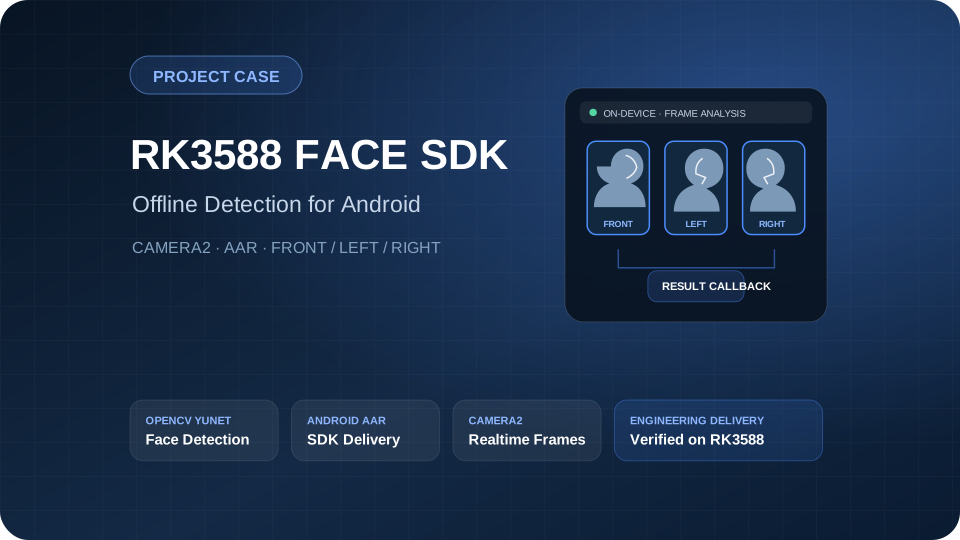
This project targeted RK3588 Android smart glasses. Front, left-profile and right-profile faces are detected locally on the device without relying on a cloud recognition service. The SDK accepts Camera2 video frames or local images and outputs a face box, five landmarks, orientation, yaw, confidence, a short-term tracking ID and processing time. The delivery included Core AAR, Face AAR, a Camera2 demo and integration documents.
This is face detection and pose-direction estimation, not identity recognition. The delivered scope does not include names or employee IDs, a face database, 1:1 verification, 1:N search, liveness detection, or age, gender and emotion analysis.
Project background
The target device was an arm64-v8a RK3588 Android smart-glasses platform. The customer needed to locate people in the camera preview for tap-to-select, local zoom and later business interactions. Processing had to remain offline on the device and be integrable into an existing Android application.
Inputs include Camera2 YUV_420_888 frames, NV21, RGBA_8888 and local still images. The implementation also had to handle a camera frame rate higher than the inference submission rate, image-buffer lifetime, rotation, mirroring, YUV stride and mapping model coordinates back to the preview.
Delivery scope
| Item | Delivered content |
|---|---|
| Android SDK | Core AAR and Face AAR |
| Demo | Camera2 real-time face-detection Demo APK |
| API | Synchronous and asynchronous detection |
| Input | YUV_420_888, NV21, RGBA_8888 and local images |
| Output | Face box, confidence, five landmarks, front/left/right orientation, yaw, trackId and per-call time |
| Documents | Integration guide, sample code, troubleshooting, release notes and SHA-256 manifest |
| Runtime | Offline processing on the RK3588 Android device |
Technical approach
The pipeline is: Camera2 or still image → format and orientation processing → OpenCV YuNet detection → geometric analysis of five landmarks → front/left/right classification → short-term tracking → result callback and UI overlay.
The delivery baseline uses OpenCV 4.10.0 and the YuNet CPU detector. The real-time pipeline scales model input to 320×320; standard still-image detection uses 640×640. All three face orientations share one detector and one SDK API, with orientation estimated from landmark geometry.
The demo submits one detection request every 100 ms, or about ten requests per second, while the preview keeps the device camera rate. Each SDK instance retains only one unfinished asynchronous request. Application-owned DirectBuffers hold Y, U and V data so a closed camera frame cannot invalidate the input. Camera2 uses acquireLatestImage() to skip stale frames and limit latency accumulation.
Root cause and correction
The customer reported that some images were detected on desktop but returned zero results in the Android demo. Comparison of the model, inputs and mobile output isolated the issue to parsing the OpenCV Java result matrix.
FaceDetectorYN.detect() returns an N×15 single-channel matrix. The original Android code did not read all 15 values in each row, so valid results were discarded by the length check. The correction reads the complete row using the matrix column and channel counts. Rotation, color conversion, fallback cropping for wide images and AAR consistency checks were added at the same time.
Regression coverage was then extended to frontal faces, profiles, no-face samples, still images and the Camera2 path so model, preprocessing, result decoding and UI-coordinate problems could be separated.
Engineering verification
The following evidence comes from the project delivery record dated 2026-07-29. It applies to Eye Algo Face SDK 0.4.5 fix5 on RK3588 Android arm64-v8a. It shows that the specified build, API and short-duration path ran; it does not establish batch accuracy, long-term stability or production performance.
| Check | Result |
|---|---|
| SDK, Core and Face unit tests | 157/157 passed |
| Standalone Demo unit tests | 13/13 passed |
| Python face-tool tests | 143/143 passed |
| Android Lint | 0 errors, 19 warnings |
| APK and AAR build | Passed |
| RK3588 installation, startup and permissions | Passed |
| Camera2 10-second path | submit/callback 79/79; dropped 0 |
| Short error scan | No crash, camera, permission or native-library error found |
The engineering sample included frontal, symmetric left/right profile and no-face negative samples. This small regression set verifies detection, direction output and the UI path only. It is not used to claim Precision, Recall, F1 or per-pose accuracy.
Project results
- Front, left-profile and right-profile detection were combined behind one Android SDK API.
- Camera2 frames and local images use one result model for integration into an existing application.
- Images are processed locally, reducing the need to upload raw video; face location and direction remain available without a network.
- Boxes and five landmarks can feed tap-to-select, short-term tracking, local zoom and downstream algorithms.
- The package contains a runnable demo, AARs, integration notes, troubleshooting and a hash manifest for reproducible build and artifact checks.
Applicable scenarios
- Person detection and target-box selection in a smart-glasses view.
- Tap-to-select and local zoom in multi-person scenes.
- On-device front, left-profile and right-profile direction prompts.
- Face-region location in offline albums or field-captured images.
- Face crops for later identity, liveness or behavior analysis; those downstream capabilities are outside this delivery.
Acceptance boundaries
The current artifact is for customer testing and engineering integration; it is not production-signed. Before release, the customer must provide production signing material and confirm annotation rules, Precision, Recall, F1, the per-pose confusion matrix and allowed thresholds on a frozen real acceptance set.
Extreme profiles, occlusion, strong glare, low light, small faces and screen recapture can still cause misses or orientation errors. A timing measurement from a single image must not be extrapolated to a mean, P95, stable frame rate or long-duration device performance. The incomplete eight-hour endurance test is not reported as passed.
Frequently asked questions
Does the SDK require a network connection?
The detection pipeline runs locally on the RK3588 Android device and does not depend on a cloud recognition service. Whether the application connects to a network depends on the customer’s own business functions.
Does this case include face identity recognition?
No. It covers face location, five landmarks and front/left/right direction. It does not provide a person name, face database, 1:1 verification or 1:N search.
How is the SDK integrated into an existing Android application?
Core AAR and Face AAR expose synchronous and asynchronous APIs. The package also includes a Camera2 demo, input-format rules, buffer-lifetime requirements, sample code and troubleshooting guidance.
Which RK3588 checks were completed?
Installation, startup, permissions, still engineering samples and a ten-second Camera2 path were checked. Formal accuracy, production signing and eight-hour stability remain separate acceptance items.
Can it be used directly on another RK3588 device?
The API and integration method can be reused, but camera specifications, Android version, orientation, stride, memory, temperature and device load differ. Build, function, performance and stability checks must be repeated on the target device.

 Online

 Phone
Phone

 WeChat



 Top
Top