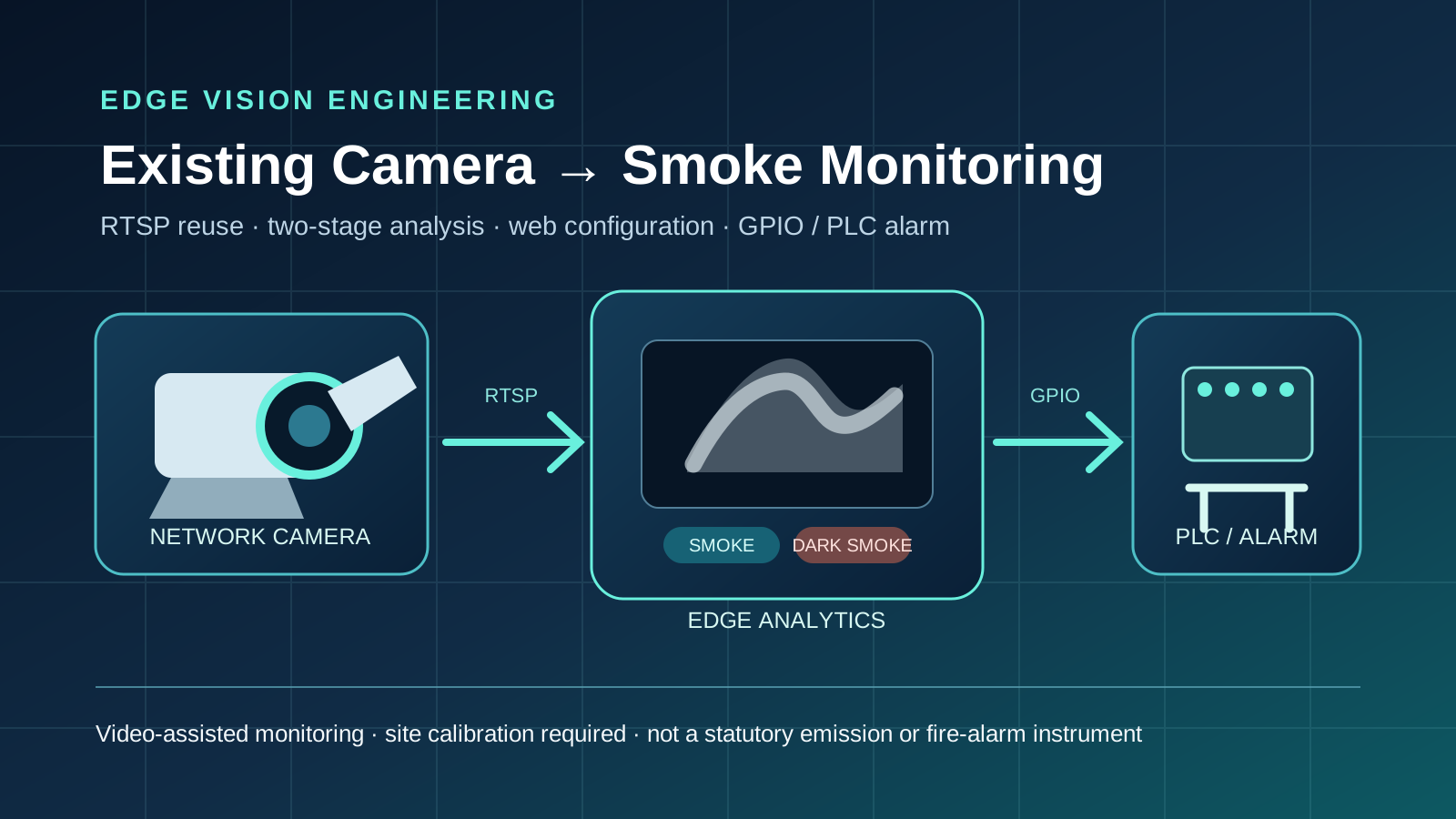
Upgrading an existing network camera for smoke and dark-smoke monitoring does not necessarily require rebuilding the video system. A practical route is to confirm that the field of view, image quality, and RTSP stream are usable, then add an edge computer, video analytics, a web console, and an alarm interface. The camera continues to capture video while the edge system performs analysis and integration.
“Automated monitoring” in this article means video-assisted industrial warning. The system continuously analyses a fixed view, first determines whether smoke is present, then evaluates smoke colour when the required conditions are met, and converts a stable result into an alarm state. It does not measure particulate concentration or Ringelmann opacity and does not replace statutory emissions monitoring, certified fire detection, or site response procedures.
1. Why reuse an existing camera
Many plants, warehouses, stacks, and production lines already have network cameras, switches, and established viewpoints. If a current image reliably covers the target area, the project can focus on adding testable analytics and alarm integration instead of installing a second video system. This can reduce duplicate cabling, installation downtime, and parallel maintenance platforms.
Reuse is a technical conclusion, not a purchasing assumption. Feasibility depends on target pixel size, exposure, backlight, vibration, occlusion, compression, weather, and background changes. These factors must be checked with the actual camera and site footage.
2. Inputs to confirm before the upgrade
| Check | Information required | Action if insufficient |
|---|---|---|
| Video interface | RTSP/HTTP URL, authentication, main and substream paths | Adjust configuration, add a protocol gateway, or replace the camera |
| Image coverage | Target zone, minimum smoke size, occlusion, and distance | Change the view, lens, or camera count |
| Image quality | Resolution, frame rate, codec, bitrate, exposure, and white balance | Select a stable stream and freeze camera parameters |
| Site network | Subnet, bandwidth, packet loss, power, and recovery behaviour | Correct routing, switching, power, or reconnection logic |
| Alarm interface | PLC/relay voltage, current, active level, and isolation | Add a driver, optocoupler, or industrial I/O module |
| Acceptance data | Positive, negative, and difficult samples plus error limits | Collect and label data before freezing acceptance criteria |
3. Reference system architecture
A typical chain is: network camera → RTSP stream → edge decoding → smoke decision → dark-smoke/non-dark-smoke/uncertain classification → temporal confirmation → GPIO or industrial I/O → PLC, relay, or beacon. A web console configures the stream, thresholds, confirmation time, output channel, and active level while showing video and alarm status.
On-site processing reduces dependence on continuous cloud upload and simplifies local control integration. It still requires engineering for decoding load, service startup, logging, persistent configuration, stream reconnection, temperature, power, and storage.
4. Why smoke and colour should be evaluated in two stages
| Stage | Input and output | Purpose | Typical interference |
|---|---|---|---|
| Smoke decision | Video sequence → smoke/non-smoke | Check whether a smoke-like spatiotemporal event is present | Steam, fog, glare, moving shadows, and compression artefacts |
| Colour decision | Smoke candidate → dark/non-dark/uncertain | Evaluate colour only after a smoke candidate exists | Night scenes, backlight, exposure shifts, dark backgrounds |
| State confirmation | Continuous results → alarm/recovery | Filter short fluctuations with duration, hysteresis, and hold time | Short settings cause chatter; long settings delay response |
Treating every dark region as dark smoke confuses shadows, dark machinery, occlusion, and underexposure with the target event. The two-stage design separates object evidence from colour attributes, making datasets, thresholds, and fault states easier to verify. When night-time evidence is insufficient, the system should return “uncertain” rather than force a colour label.
5. Selecting the camera stream
Higher resolution and frame rate are not automatically more suitable. A high-resolution H.265 main stream can increase network, decoding, and memory load, while an excessively small substream may remove smoke texture. Main and substreams should be tested against target pixels, motion continuity, and sustained decoding capacity on the selected edge computer.
Freeze the codec, resolution, frame rate, bitrate, keyframe interval, exposure, and white balance used for acceptance. Record dropped frames, reconnections, and resource use during a continuous run. A later stream change should trigger renewed functional and stability checks.
6. Responsibilities of the edge computer
The edge device runs more than a model. It decodes video continuously, schedules inference, maintains an event state machine, stores configuration, serves the web interface, and controls outputs. Hardware selection should consider CPU/NPU/GPU or other acceleration, hardware decode support, network ports, USB/serial/GPIO, operating temperature, watchdogs, and power-recovery behaviour.
The software delivery should identify the operating system, runtime libraries, video decoder, and model versions. It should include service startup, health checks, log rotation, upgrade rollback, and configuration backup. A model running on a development workstation is not evidence of sustained operation on the target device.
7. Connecting the alarm to a PLC or beacon
An algorithm state should not automatically become a machine-stop command. A safer integration defines the vision result as an inspection or interlock request. The PLC then combines it with process state, other sensors, and fail-safe logic to select logging, a beacon, operator confirmation, or shutdown.
USB GPIO and logic-level modules generally cannot drive high-current loads directly. Confirm voltage, current, common reference, isolation, normally-open/normally-closed logic, power-up state, and disconnected state. Add an optocoupler, relay driver, or isolated industrial I/O where required and complete an electrical acceptance test.
8. Web configuration and maintenance
A maintainable baseline includes stream address and connection status, algorithm enablement, smoke and colour thresholds, confirmation and hold times, output channel and active level, a test mode, current decision, logs, and version information. Test functions should be isolated from physical output by default and only drive an output after explicit authorization.
Access across subnets or from the internet also requires authentication, HTTPS, access control, protection of camera credentials, and log redaction. A local diagnostic page without authentication should not be exposed directly to the public internet.
9. Implementation stages
| Stage | Main work | Reviewable output |
|---|---|---|
| 1. Site assessment | Review view, lighting, samples, streams, network, and I/O | Input list, risks, and camera reuse decision |
| 2. Data and metric freeze | Prepare positive, negative, and difficult conditions | Dataset version, label rules, and acceptance metrics |
| 3. Prototype | Implement stream input, two-stage logic, and offline tests | Reproducible software, model, and test report |
| 4. Device integration | Deploy to the target edge computer and connect web/I/O | Installer, configuration, wiring, and rollback package |
| 5. Site calibration | Adjust thresholds and timing for the actual viewpoint | Parameter baseline and false/missed-event log |
| 6. Stability validation | Test stream loss, restart, power loss, heat, and duration | Runtime logs, recovery evidence, and terminal state |
10. Acceptance needs more than “detection succeeded”
Separate algorithm, video-chain, alarm-output, and recovery metrics. Algorithm evidence should include precision and recall or event-based false-alarm frequency and missed-event scope. Video evidence should include connection status, continuous duration, reconnection time, and frame updates. Output evidence should include trigger conditions, hold time, recovery state, and power-off default level.
Every result must identify the device, camera, stream, software version, sample scope, thresholds, and test period. Passing one demonstration video only shows that the video ran under that configuration; it is not formal acceptance for another site.
11. Procurement value
For development and procurement teams, the value is a complete path that combines existing cameras, edge analytics, configuration, and alarm interfaces. It can reduce duplicate infrastructure, shorten the integration route, and establish a repeatable baseline for additional viewpoints. Actual cost still depends on camera reuse, data coverage, cabling, I/O isolation, and acceptance depth.
A request for quotation should separate hardware, software licence or source, model, deployment, field calibration, data work, acceptance testing, maintenance, and future expansion. An algorithm demonstration and an integrated field delivery are not the same scope.
12. Limits and unsuitable conditions
- The system is video-assisted monitoring; it does not report pollutant concentration, Ringelmann grade, or a regulatory conclusion.
- It does not replace statutory emissions monitoring, fire detectors, fire-alarm controllers, or site safety procedures.
- Night scenes, strong backlight, rain, snow, fog, steam, severe occlusion, and camera movement need dedicated data and separate acceptance.
- Critical shutdowns require PLC safety logic, electrical isolation, and a site risk assessment; a single vision output should not be the sole control.
- Changing the camera, view, stream, edge computer, or model version requires renewed functional, accuracy, and stability verification.
13. Information required to start
Prepare the camera make, model, and firmware; sample RTSP information; original day and night footage; target-zone size; mounting distance and angle; network topology; available power; edge-device constraints; PLC or alarm-input specification; expected response time; tolerable false-alarm frequency; events that must be detected; and video/log retention requirements.
For an implementation example, see the RK3588 industrial smoke detection and MCP2221A alarm delivery case. It documents one device and sample baseline; a new project still requires assessment against its own site.
Frequently asked questions
Can every CCTV camera be upgraded directly?
No general conclusion is possible. The camera needs an accessible stream, a stable view, enough target pixels, and controllable exposure. Cameras with unstable streams or insufficient target detail may need adjustment or replacement.
Why not classify the image by darkness alone?
Dark machinery, shadows, and underexposure are not dark smoke. Smoke-first, colour-second logic separates the event class from its visual attribute and avoids an obvious source of false alarms.
Can the system replace manual inspection?
It should be treated as continuous screening and an inspection trigger. Event confirmation, process judgement, and safety response remain part of the established control and personnel procedures.
Can a vision result stop equipment directly?
The PLC or safety controller should make that decision using additional states, isolation circuits, failure modes, and the site risk assessment. Vision can be one input to that decision.
How is an upgrade budget estimated?
Cost depends on reusable camera count, edge devices, collection and labelling, algorithm adaptation, I/O, cabling, deployment, acceptance, and support. Freeze the inputs and run a small site validation before preparing a traceable quotation.
Do SEO and structured data ensure indexing?
No. Localized titles, semantic structure, internal links, canonical URLs, hreflang, and TechArticle data help search and answer systems understand the page, but indexing, ranking, and presentation remain platform decisions.


 Online

 Phone
Phone

 WeChat



 Top
Top